The two sides of the product
Solar Desk is sold to installers and used by homeowners, and the two groups never look at the same screen. Almost every “why can I not…” question turns out to be somebody standing on the wrong one of these two sides, so it is worth five minutes to get the shape of it clear.
Two addresses, not one
Section titled “Two addresses, not one”The customer side lives at the installer’s own address, meridian.solardesk.app,
where meridian is the web address that installer chose when they signed up. It
is mobile-first, because people answer these questions on a phone, and it is
painted in the installer’s colours with the installer’s name at the top.
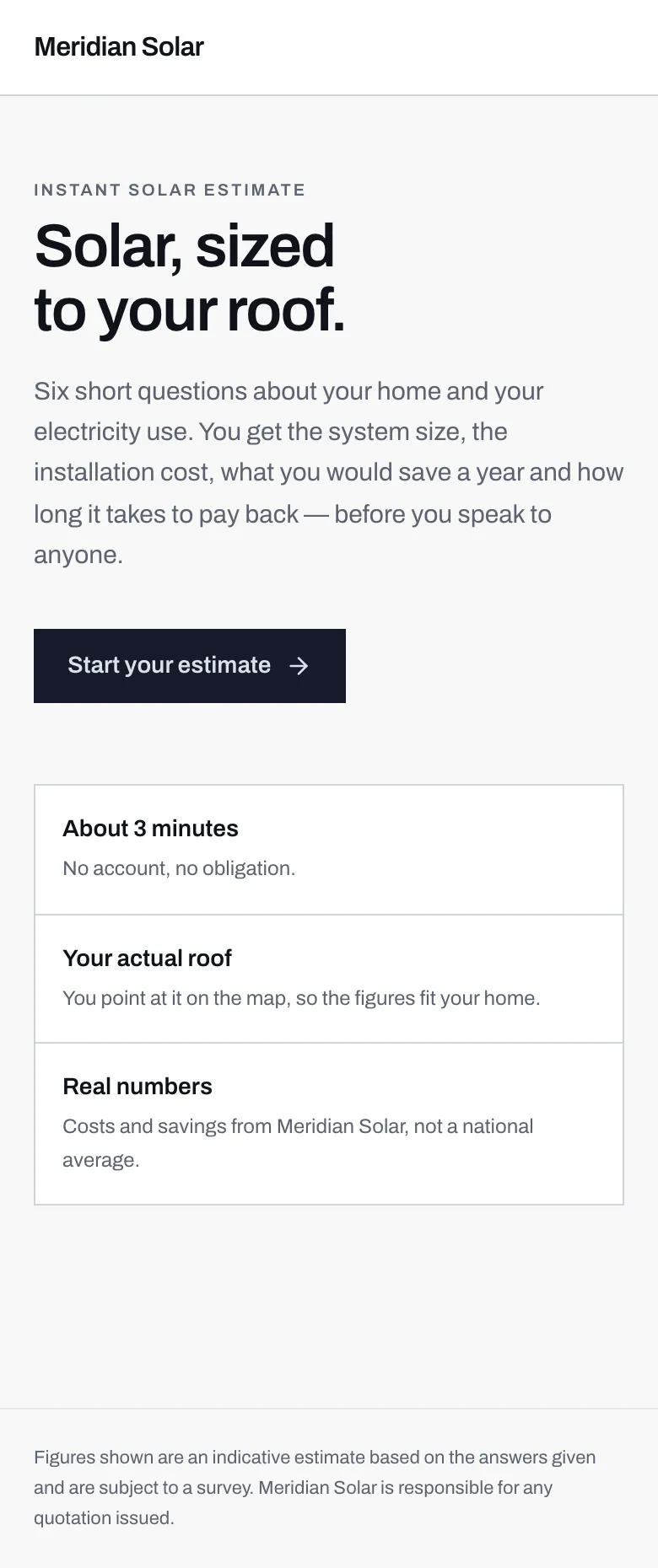
- The installer's name and branding. A real installer's own colours and logo go here, and the words Solar Desk appear nowhere on the page.
- The standing footer names the installer as responsible for any quotation. Solar Desk is the tooling behind it, not a party to the sale.
The installer side lives at solardesk.app. It is desktop-first, because it
is a working tool, and it is always branded Solar Desk. The Theme settings page
says so in as many words: those settings dress the calculator, the emails and
the quote PDFs, and the dashboard stays Solar Desk.
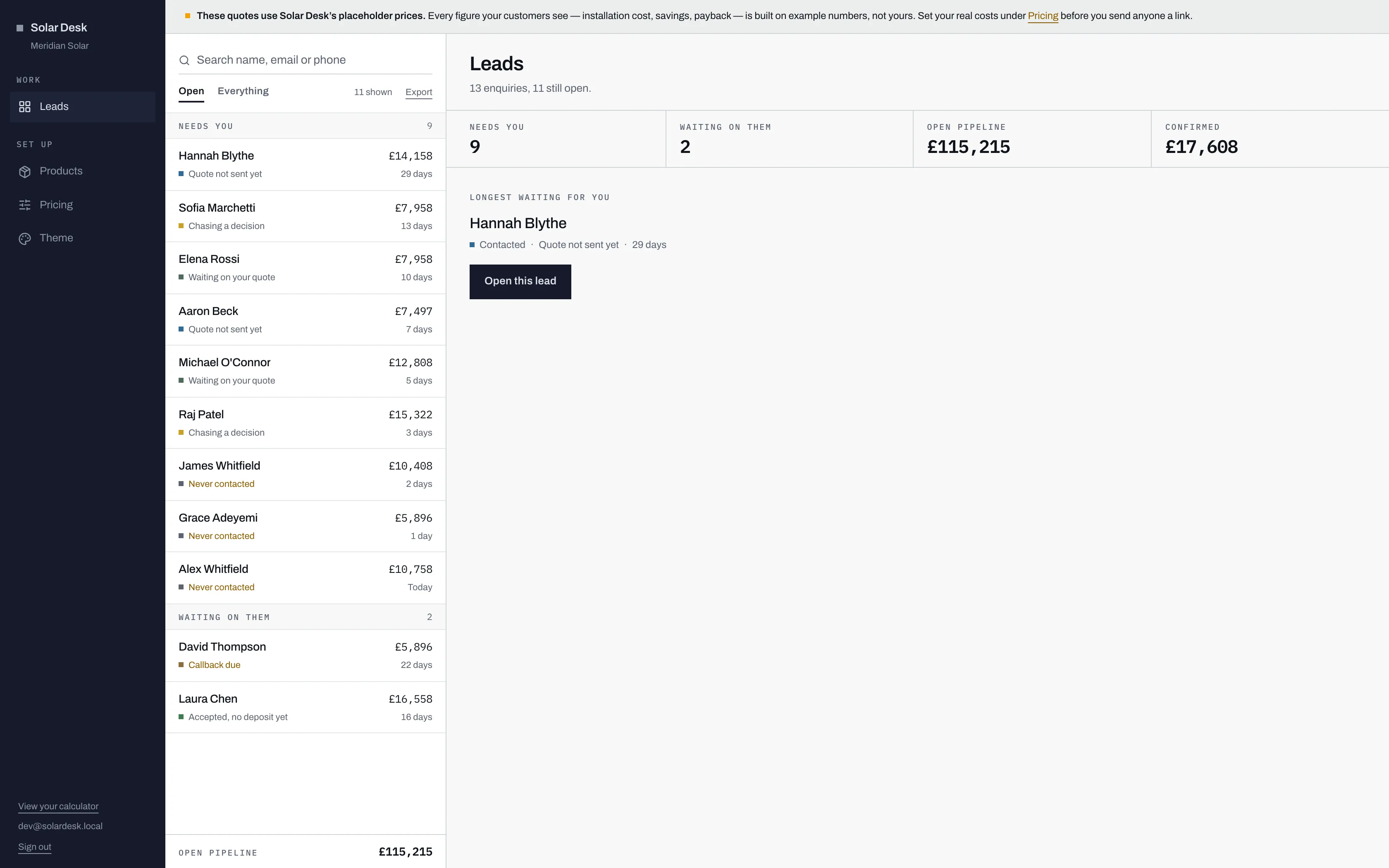
- Solar Desk first, then the installer's name underneath. This is the one screen in the product that is deliberately not white-labelled.
- View your calculator jumps across to the customer side, so you can see what a homeowner sees.
Which is which
Section titled “Which is which”| The customer side | The installer side | |
|---|---|---|
| Address | meridian.solardesk.app |
solardesk.app |
| Who uses it | Homeowners looking for a price | The installer’s own staff |
| Branding | The installer’s, throughout | Always Solar Desk |
| Built for | Phones | Desktops |
| Getting in | No account needed for an estimate. A homeowner account is optional, and opens with an emailed link | Email and password, at solardesk.app/login |
| What it does | Six steps to an estimate, an instalment plan, then quotes, messages and documents in an optional account | Pipeline, quoting, pricing, product catalogue, branding, Excel export |
Who signs in where
Section titled “Who signs in where”The two sign-ins are genuinely different mechanisms, not the same one wearing two hats:
- Installer staff use an email address and a password. There is no password reset, so the password needs storing properly. See Signing in.
- Homeowners have no password at all. They ask for a sign-in link, it is emailed to them, and it works once and expires after fifteen minutes. Most people use their account twice a year, so a password would mostly be a thing to reset. See Signing in to your account.
Homeowner accounts are also per installer. Someone dealing with two installers has two separate accounts and neither installer can tell, which is deliberate: a shared account would leak whose customer somebody is.
Why a homeowner never sees the words “Solar Desk”
Section titled “Why a homeowner never sees the words “Solar Desk””Because the calculator is the installer’s shopfront, and an installer sending customers to somebody else’s brand is a worse deal than they signed up for. So the white-labelling goes further than the page they land on:
- The estimate confirmation, the quotation, the sign-in link and the alert when a message arrives are all sent as the installer: their name, their colours, their wording.
- The quote PDF is branded, and the footer on every email names the installer as responsible for any quotation issued.
- The homeowner’s account sits inside the same branded shell, at
meridian.solardesk.app/account.
Solar Desk is the name of the thing installers log into. That is the whole reason it reads as business tooling rather than as a consumer solar brand.
What the installer controls, and what they do not
Section titled “What the installer controls, and what they do not”Under Theme an installer sets their colours, the tagline, the labels on all six calculator steps, how quickly they promise to ring back, how long a quote stays valid, and whether finance is shown at all. A readability check has to pass before any of it saves, so a palette cannot make a customer’s estimate unreadable.
A logo goes up on the same page, as a PNG, WebP or JPEG. It appears in the branded header in place of the company name, on the calculator; the quote PDF and the emails still carry the name rather than the logo.
And a third surface, briefly
Section titled “And a third surface, briefly”Solar Desk’s own staff have a console at solardesk.app/operator for taking new
installers live and suspending accounts. It shows counts, never leads: an
installer’s enquiries belong to the installer. See
the operator guide if that is your job.