Reading and accepting a quote
A quotation is the real document: itemised, priced by a person, with a date it runs out. It is a different thing from the instant estimate you started with, and it is the one that matters.
If your installer sends you one, it arrives by email as a PDF and it also appears in your account, on the job it belongs to.
Reading a quotation
Section titled “Reading a quotation”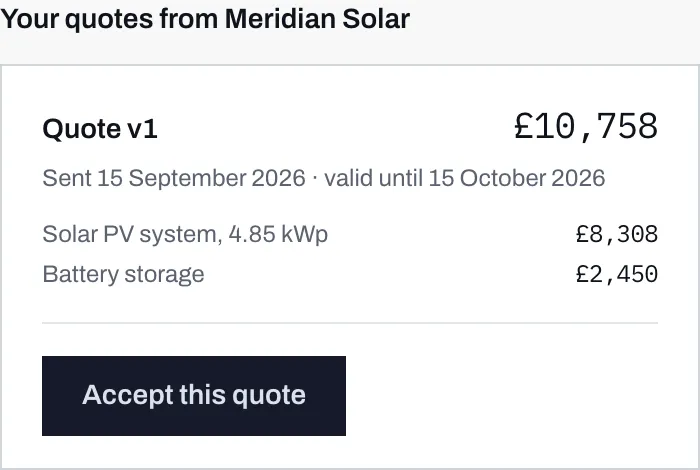
- The version number and the total. Version 1 is the first one they sent you.
- When it was sent, and the date it stops being valid. The window is the installer's own setting.
- The line items. This is what you are actually buying, broken down.
- Accepting online, if you want to. There is a confirmation step after this button.
Each quotation shows:
- A version number, written as v1, v2 and so on.
- The total.
- When it was sent, and when it expires. Once past that date the quotation reads as expired, and you would need a fresh one.
- The line items, each with its own price. This is the part to read.
- Any notes the installer added for you.
Only quotations they have actually sent appear here. Anything they are still drafting is invisible to you, which is as it should be.
Versions
Section titled “Versions”If the installer changes the quotation, they do not edit the one you have. They send a new version, and the old one stays in your list marked Superseded by the newer one.
That is deliberate, and it is in your favour. You have the earlier PDF sitting in your inbox, and a quotation that quietly changed underneath you would be worse than useless. This way you can compare what changed between v1 and v2 and ask why.
Older versions carry a small label saying where they stand: superseded, expired, or accepted with the date.
Accepting online
Section titled “Accepting online”At most one version can be accepted at a time: the newest one they have sent, provided it has not expired and you have not already accepted something.
Press Accept this quote and you get a confirmation before anything happens.

- The exact wording you are agreeing to, shown before you agree to it.
- Yes, go ahead. This is the click that counts.
- Not yet backs out and changes nothing.
The wording you are agreeing to is this:
I would like to go ahead with this quotation from Meridian Solar. I understand this is not a contract: Meridian Solar will confirm the details and arrange a survey before any work is agreed.
Your installer’s name appears where Meridian Solar does.
When you accept, the exact wording you were shown and the total you were shown are both recorded alongside your acceptance, so there is a record of what you saw rather than a reconstruction of it afterwards.
After you accept
Section titled “After you accept”
- The job itself now reads Accepted.
- The quotation carries the date you accepted it, and the Accept button is gone.
The job is marked accepted, the quotation shows the date, and in the installer’s own list your enquiry now reads Accepted, filed under “Waiting on them”. Nobody has to be told separately.
Their side has a second, different step for recording a sale, which they only use once a survey and paperwork exist. Your click and their click are kept apart on purpose, because a homeowner pressing “yes” has had no survey, paid no deposit and signed nothing.
If the Accept button is missing
Section titled “If the Accept button is missing”Three ordinary reasons:
- You have not used a sign-in link yet. If your account came from ticking the box at step 6, the job page shows your estimate and nothing the installer has added to it, quotations included, until you have proved the email address is yours. In their place is a note with an Email me a sign-in link button. See signing in.
- The quotation has expired. Ask for a fresh one.
- It has been superseded, and the newer version is the one to accept.
If you would rather not accept online at all, do not. Telephone them. The button is a convenience, not the only way.