Amending a quote
There is no way to edit a quote. The button under the versions in the Quote panel reads Amend as v2, then v3, then v4, and each time it writes a whole new version and leaves everything before it exactly where it was.
Why it works this way
Section titled “Why it works this way”Because the customer has the old one.
The moment you press Send, a PDF with a price on it is in somebody’s inbox and out of your control. Quietly rewriting the version behind it would leave you with a record that disagrees with the document your customer is holding, and there is no argument you can win from that position. It also means that when they ring in three weeks saying “your quote said nine and a half thousand”, you can open the version they actually received rather than guessing which draft they are looking at.
The same applies to your pricing, which works the other way round for the same reason: saving new pricing writes a new version of your figures rather than editing the old, so quotes you have already sent keep the numbers they were built on.
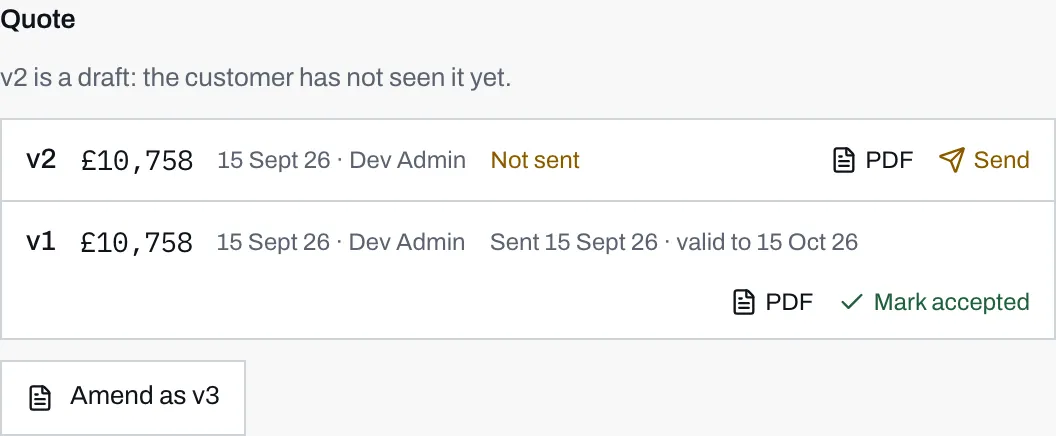
- A new version starts as Not sent, with Send beside it. Amending a quote does not send it.
- The earlier version keeps its own state: sent on its own date, valid until its own date. Mark accepted is the button an admin presses to record a sale.
- The button always offers the next number. There is no edit and no delete anywhere in this panel.
What each row tells you
Section titled “What each row tells you”Left to right: the version number, the total, the date it was written and who wrote it, then its state. The states are:
| State | What it means |
|---|---|
| Not sent | Saved in your dashboard only. The customer knows nothing about it. |
| Sent, with a date and a “valid to” date | Emailed, and live in the customer’s account until that date. |
| Sent, with a date and “expired” | The validity window has passed. Nothing is deleted; it just cannot be accepted online. |
| Accepted, with a date | An admin at your company recorded the sale. |
| Accepted by the customer, with a date | The homeowner pressed the button themselves. |
The last two are worded differently on purpose. A rep walking into a call needs to know whether the yes came from the customer or from a colleague ticking a box, and one word is enough to say which. See when a quote is accepted.
Every row keeps its PDF link forever, sent or not, accepted or superseded.
Above the list, one line sums up where the quoting stands as a whole: whether the newest version is still a draft, when it went and how long it holds, whether it has expired, or which version was accepted and whether the customer did it.
What the customer sees
Section titled “What the customer sees”Only sent versions ever appear in a homeowner’s account, and once a version is sent it stays visible. They see the history you see, minus the drafts.
Each one carries a state of its own:
- The newest sent version, if it has not expired and nothing has been accepted, is the one with an Accept this quote button.
- Everything older reads Superseded by v3 (or whatever the newest number is), with no button.
- An expired quote reads Expired.
- An accepted one reads Accepted with the date.
Exactly one version is acceptable at any moment, which is why sending v3 quietly takes the offer of v2 off the table without you having to withdraw anything. Amending is how you revise a price, and it is safe: the customer can no longer accept the number you have moved on from.
When to amend, and when not to
Section titled “When to amend, and when not to”Amend when the price or the contents change: a survey found something, the customer wants the battery after all, you have agreed a discount.
Do not amend to fix a typo in a quote nobody has been sent. Nothing has left the building, so press Cancel, and start again from the same button. The version number only counts up once something is saved.
Do not amend to chase somebody. A second identical version says nothing that a message or a phone call would not say better, and it takes the previous offer off the table for no reason.