Previewing your calculator
While your account is pending, your calculator answers a 404 to the public and opens normally for you. That is the useful half of being pending: you get to walk the whole thing as a customer would, with nobody able to follow you in.
There are two ways to look, and they answer different questions.
The quick look: the panel in Theme
Section titled “The quick look: the panel in Theme”The right-hand side of the Theme screen is a live mini calculator in your palette, updating as you type.
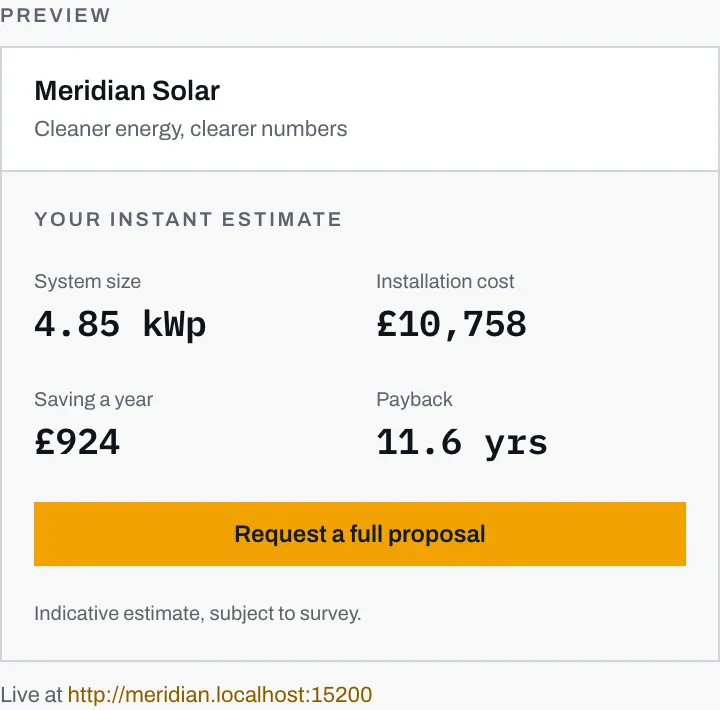
- Your name, your tagline, the four figures and your main button, in whatever colours are currently in the pickers.
- The address your calculator lives at, so you can get to the real thing from here. It reads Preview at while you are pending, and Live at, as here, once you are live.
Use it while you are choosing colours, and stop trusting it the moment you want to know whether the thing actually works.
The real thing: the link at the bottom of the rail
Section titled “The real thing: the link at the bottom of the rail”At the bottom of the left rail is a link to your own calculator. It reads “Preview your calculator” while you are pending and “View your calculator” once you are live, so the wording alone tells you which state you are in. It opens in a new tab, which keeps the dashboard where you left it.

That link opens your real calculator, on your real address, running your real pricing and your real catalogue. Everything a customer would meet, minus the customers.
The preview banner
Section titled “The preview banner”Every page you open that way carries a banner across the top:
Preview. This page is not live, your customers currently see a 404.
It appears for you, for your colleagues, and for Solar Desk operators, because all three are signed in. It never appears for a member of the public, for the simple reason that a member of the public cannot load the page at all. Once you go live the banner disappears on its own; there is nothing to remember to turn off.
What to look at while you are in there
Section titled “What to look at while you are in there”-
Do it on a phone. The calculator is built mobile-first and that is where most customers will meet it. A layout that reads well on your desktop monitor is not evidence of anything.
-
Read your own step labels. Steps 1 to 6 carry whatever wording you set in Theme, and wording that looked fine in a settings box reads differently at the top of a form.
-
Check step 4 names hardware you fit. The panel and battery pickers come straight from your catalogue. If either one is missing, the picker is hidden rather than wrong, which is easy to miss.
-
Check the four figures on step 5 against what you would actually quote. This is the only real test of your pricing sheet. System size, installation cost, annual saving and payback, in public, in your name. If any of them makes you wince, the fix is on the pricing page, not here.
-
Read step 6 as a customer. The callback promise (“within 48 hours” by default) and the consent paragraph both name your company. You are the one who has to honour the first and stand behind the second.
Once you are happy, the remaining question is whether you can go live at all, which comes down to three specific checks.