What "not live yet" means
Every new account starts pending, and stays pending until a Solar Desk operator switches it on with you. Nothing you do in the dashboard changes that by itself, because being live is not a setting you own.
What pending blocks
Section titled “What pending blocks”One thing, and only one: the public.
Your calculator answers a 404 to anyone who is not signed in to your account. Not a holding page, not “coming soon”, a plain 404. To a stranger, your web address is indistinguishable from an installer that does not exist.
That is deliberate, and the reason is your pricing. A brand new account carries Solar Desk’s example figures, which are not a market rate and are not yours. A 404 is the only honest thing to show while that is true. The alternative is someone walking away with an installation cost and a payback period you would never have quoted, in your name.
What still works
Section titled “What still works”Everything else. The dashboard is fully writable while you are pending, which is the whole point of the state: it exists so you can do the setup properly rather than against the clock.
- Pricing, Products and Theme all save normally.
- Leads works, though it will be empty until you are live and a customer has been through the calculator.
- Quotes, notes, messages, documents and the Excel export are all available.
A banner across the top of every screen says where you stand.
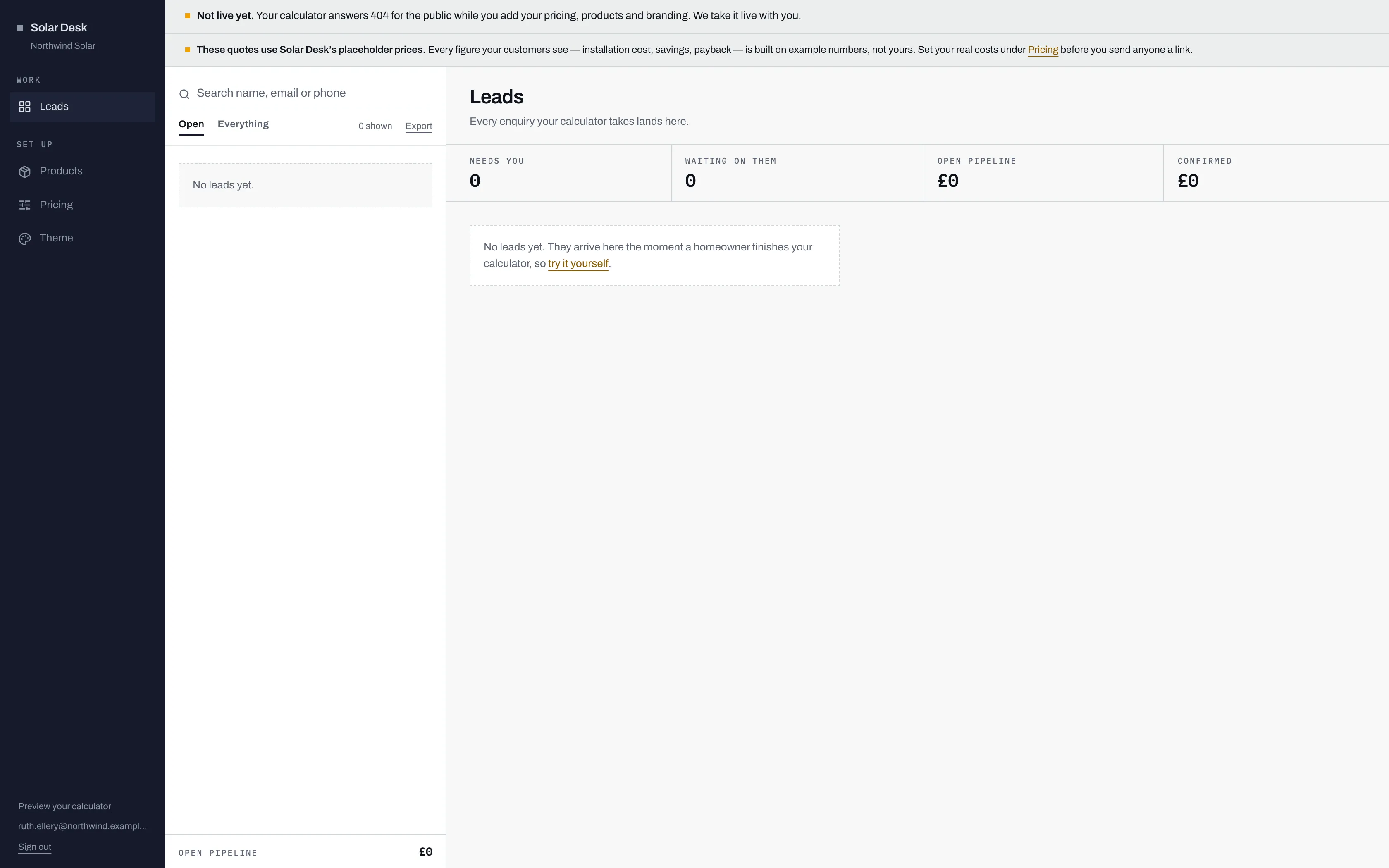
- The banner sits above everything, on every screen: "Not live yet. Your calculator answers 404 for the public while you add your pricing, products and branding. We take it live with you."
- A separate amber warning, on both Leads and Pricing, saying the figures are still Solar Desk's placeholders rather than yours. Replacing your costs is what clears it.
- The queue and the overview are empty because nobody can reach your calculator yet, not because anything is broken. Every control on them still works.
- The link to your own calculator, at the bottom of the rail. While you are pending it reads "Preview your calculator".
Previewing it anyway
Section titled “Previewing it anyway”You and your colleagues can open the calculator while it is pending, and so can Solar Desk operators. Nobody else can. The way in is the link at the bottom of the rail, which opens your calculator in a new tab.

- All four screens are fully usable while you are pending, so the setup work happens here in whatever order suits you.
- The link reads "Preview your calculator" while you are pending, and "View your calculator" once you are live. Same link, different word, so you can always tell which state you are in.
Every page you open that way carries its own banner: “Preview. This page is not live, your customers currently see a 404.” That banner is for you, and only ever appears to someone signed in, so there is no risk of a customer reading it.
Previewing your calculator covers what is worth checking while you are in there.
The three things we check
Section titled “The three things we check”Going live is a conversation, not a form, but it is not a vague one. Three specific conditions have to be true before an operator can switch you on:
- Your pricing is no longer Solar Desk’s placeholder.
- There is at least one panel in your catalogue, marked as offered.
- There is at least one address set to receive new leads.
Each one is a way of failing badly in public: a wrong number, hardware you do not fit, or an enquiry that arrives with nobody told. The go-live checklist explains how to clear each of them.
Being noticed
Section titled “Being noticed”Signing up emails every Solar Desk operator, so you do not have to chase anyone to be seen. What you do have to do is clear the three blockers, because until they are clear the activation button refuses.