Sending a quote
Saving a quote and sending it are two separate actions. A saved version is marked Not sent and has reached nobody. Send is the only thing on the lead that puts a price in front of a customer.
What Send does
Section titled “What Send does”Pressing Send on an unsent version does four things in one go.
- It renders the quotation as a branded PDF, in your colours, with your company name and tagline on it.
- It emails that PDF to the address on the lead, as an attachment, with the subject “Your solar quotation from” followed by your company name.
- It makes the quote visible in the customer’s account, if they have one. Only sent versions ever appear there.
- It stamps the row with when it went, who it went to, and when it expires.
A quote emailed from Outlook is a quote your pipeline cannot see, which is why sending happens here and the record is written in the same breath.
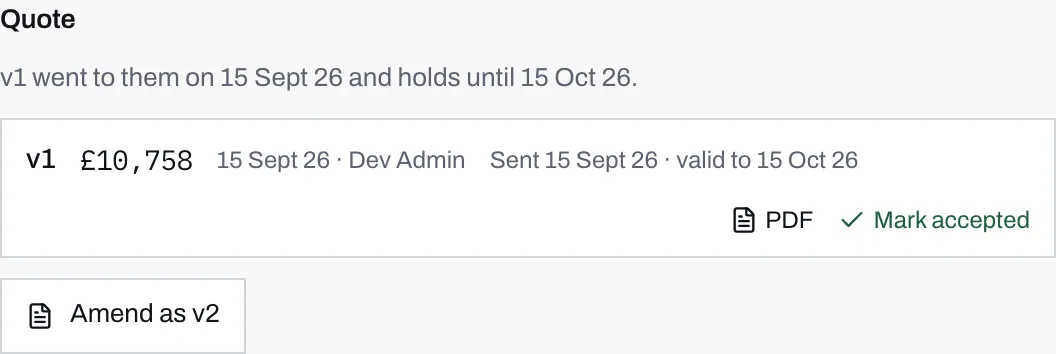
- Once sent, the row carries the date it went and the date it stops being valid.
- PDF opens exactly what the customer received. It stays available on every version, sent or not.
- Send is gone and Mark accepted has taken its place, which only an admin sees.
What the customer gets
Section titled “What the customer gets”The email is from you, not from Solar Desk. Your sender name, your palette, your wording. Nothing in a homeowner’s inbox says Solar Desk, on this email or any other.
It greets them by first name, gives the total and the panel count in the body, and attaches the PDF. The PDF itself carries a quotation reference, the version number, the date, their name and contact details, the system and its expected generation and payback, every line with its detail and price, the subtotal, any discount and the total, your notes to them, and, where finance is on, a representative example with the deposit, the monthly figure, the APR and the lender.
Every one of your emails ends with the same footer, which says the figures are indicative, subject to survey, and that your company is responsible for any quotation issued.
Replies come to the sender
Section titled “Replies come to the sender”The email’s reply-to address is the personal address of whoever pressed Send, and the body says as much: any questions, reply and it reaches that person directly.
This is worth knowing before you send on a colleague’s behalf. If you press Send on a quote your colleague built, the replies land with you, not with them.
Expiry
Section titled “Expiry”The valid to date is the day you sent it plus your “How long a quote stays valid” setting, which lives with the rest of your branding and behaviour settings and can be anything from 1 to 365 days.
The clock starts when you send, not when you save. A quote that sat in the dashboard unsent for three weeks was never on offer, so it would be dishonest to start counting from the day it was drafted.
Once the date passes, the row reads “Sent” with the date and then “expired”, instead of naming a valid-to date, and the customer sees Expired on it in their account. Nothing is deleted and the PDF still opens. An expired quote simply cannot be accepted online any more, and the way to revive it is to amend it as a new version and send that.
The expiry date is not printed on the PDF. It is shown on the row here and in the customer’s account, so a PDF forwarded to a relative in six months does not carry a date that has quietly lapsed.
When no mail provider is configured
Section titled “When no mail provider is configured”On an account with no mail provider set up, Send is honest about it:
Marked as sent. No mail provider is configured, so nothing left the building, the PDF is above.
The version is still marked sent, the expiry clock still starts, and the customer can still see it in their account. What did not happen is the email. If you get this on a live account, open the PDF, send it yourself, and tell us, because your customers are not being emailed anything else either.
When it will not send
Section titled “When it will not send”“This lead has no email address.” Nothing can be sent. Every enquiry through your calculator carries an email address, so this only happens on a lead that reached the pipeline some other way. Phone them, or ask for an address through another channel.