Your product catalogue
Products is your catalogue: the hardware a customer picks from on step 4 of the calculator. It exists so that the calculator never offers something you do not fit. Adding and editing is admin only.
Why a new account has nothing in it
Section titled “Why a new account has nothing in it”New accounts ship with an empty catalogue, on purpose. Seeding it with a sensible-looking set of panels would put someone else’s hardware into your quotes, which is the one thing a white-label tool cannot do. Your catalogue is yours from the first row.
Until you add a panel the calculator hides the panel picker altogether, rather than offering something you might not stock. The estimate still works, because the system size comes from the wattage on your pricing sheet rather than from the product. But a calculator with no named hardware is a thin thing to send a customer, which is why “at least one active panel” is one of the three go-live blockers.
The three sections
Section titled “The three sections”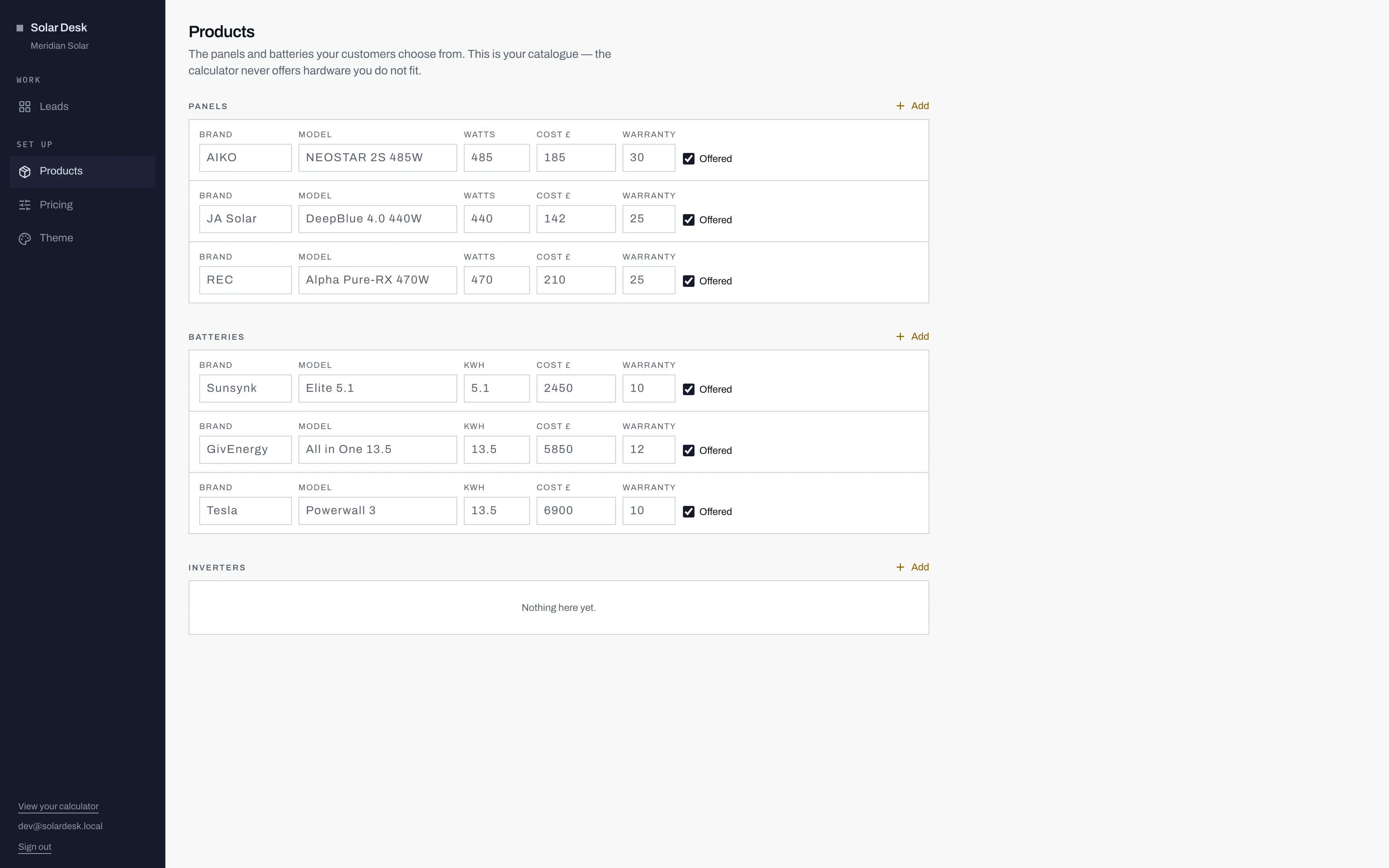
- Each section has its own Add control, and only an admin sees it.
- Offered decides whether customers can pick this one. Untick it and the product stays in your catalogue but drops out of the calculator.
- An empty section reads "Nothing here yet." Inverters can stay that way: nothing in the customer's journey asks about one.
Panels, Batteries and Inverters, each with its own Add.
The fields
Section titled “The fields”Per row: Brand, Model, Watts for a panel or kWh for a battery, Cost £, Warranty in years, and the Offered checkbox.
Rows save one at a time. The Save button appears on a row only once you have changed something on it, so an accidental click somewhere else on the page cannot commit an edit you did not mean.
Offered
Section titled “Offered”This is the switch that matters. Ticked, the product appears in the calculator. Unticked, it stays in your catalogue and disappears from the customer’s choices.
That is also how you retire something, because there is no delete control on this page. When a panel goes out of production, untick Offered rather than looking for a way to remove the row.
Inverters
Section titled “Inverters”Worth being straight about: nothing in the customer journey asks about an inverter. The calculator does not offer a choice, the estimate does not name one, and neither does a quote beyond the general line about inverter, mounting and scaffolding. The section is a record for your own use. An empty Inverters list will not hold up going live.
What a customer sees
Section titled “What a customer sees”On step 4 of the calculator, the panel picker lists each offered panel by brand, model, wattage and guarantee on one line. If the customer ticks Add a battery, a second picker lists your offered batteries the same way, by capacity.
Two things follow from that. The Model field is read by a member of the public, so write it as you would on a proposal rather than as a stock code. And the Warranty number is shown as a guarantee in years, next to the panel name, which makes it one of the more persuasive fields on the page and one worth getting exactly right.