Reading a lead
Picking a lead in the queue opens it beside the queue. Everything the customer told the calculator is on this one screen, in the order you need it on a call: what to open with first, then their roof, then their answers and the system they built for themselves.
The point of the layout is that you should be able to say “you could take ten panels, not eight” before you dial, rather than discovering it halfway through a second conversation.
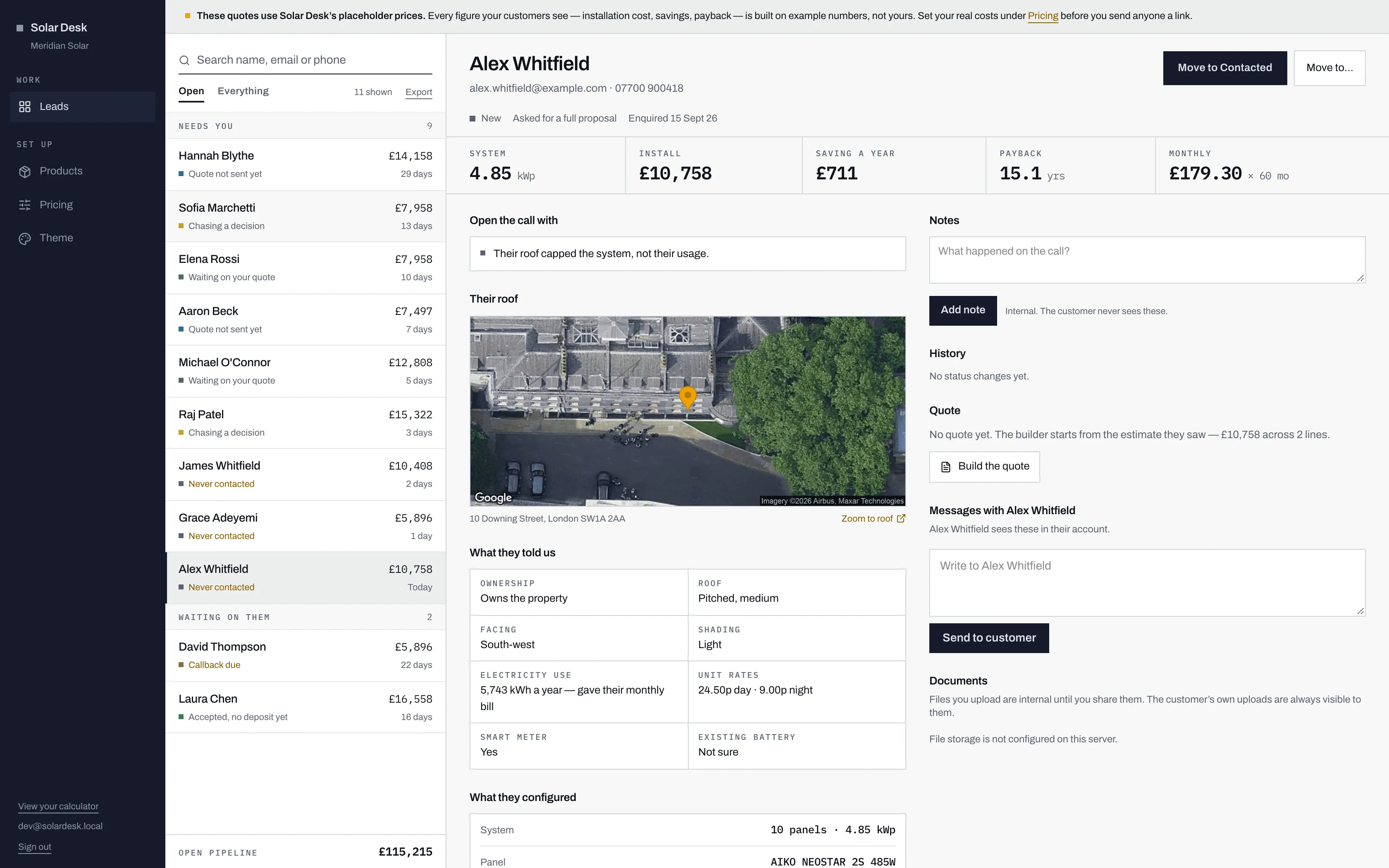
- Which of the two things they asked for, a full proposal or a callback. It changes what your first action should be.
- The usual next move for this lead, in one click. Move to… beside it offers every other status.
- The five figures the customer saw: system size, installation cost, yearly saving, payback and the monthly instalment.
- The right-hand column is what your team does with the lead: notes, history, the quote, messages and documents.
The header
Section titled “The header”Under the name sit the email address and the phone number, and both are links: the phone number rings through whatever your computer uses for calls, and the email opens a new message.
The line under them tells you what kind of lead this is, and when it arrived:
- The status, with its colour square.
- “Asked for a full proposal” or “Asked for a callback”. A proposal customer chose the written route and expects something itemised; a phone call that starts by reading the estimate back to them will feel like a delay. A callback customer chose to talk. Something is unresolved, and sending a PDF answers none of it.
- “Prefers …”, when they told the calculator when to reach them, in their own words, along the lines of “weekday evenings” or “after 6pm”. It is free text, so read it rather than relying on it.
- “Enquired”, and the date they did.
Moving the lead on
Section titled “Moving the lead on”Two buttons sit on the right of the header. The dark one makes the move a rep usually makes next from this status, and says which: Move to Contacted on a new lead, Move to Interested once you have spoken, Record the sale on an accepted one. It never names a task it does not do. It moves the status and records the change in History, and sending a quote, for example, is still done from the Quote panel.
Move to… opens every status at once, with the current one shaded, for anything else: a customer who asks you to ring back next month, or one who has gone with somebody else.
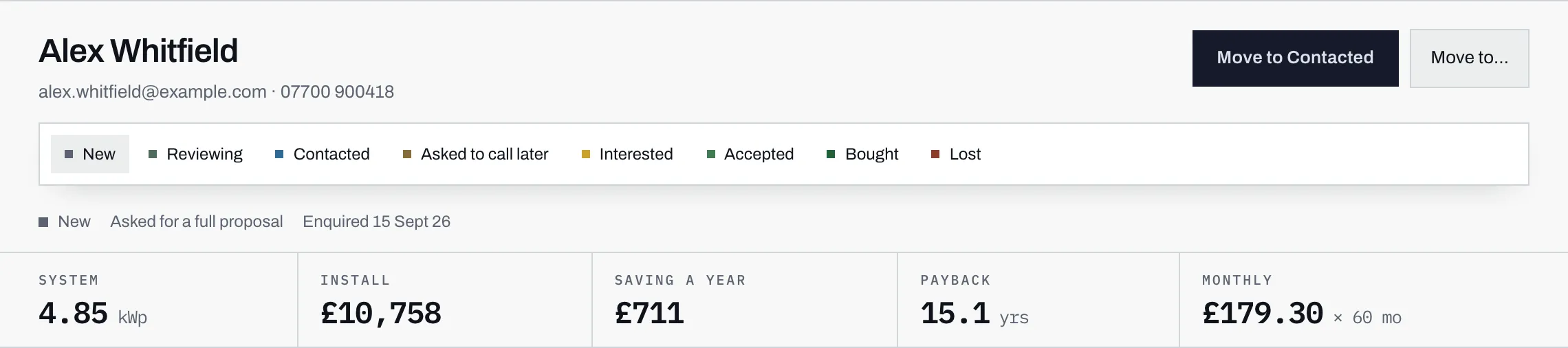
See moving a lead through the pipeline for what each status means.
The five figures
Section titled “The five figures”Across the top runs the estimate the customer saw: System in kWp, Install, Saving a year, Payback in years, and Monthly, the instalment they were shown and the number of months. Payback reads Never rather than a number when the system never pays for itself on the figures given, and Monthly reads One-off for a customer who chose to pay in one go.
They have already seen these numbers, so quoting a different one without explaining why is the fastest way to lose them. If your quote changes the term or the deposit, say so.
Open the call with
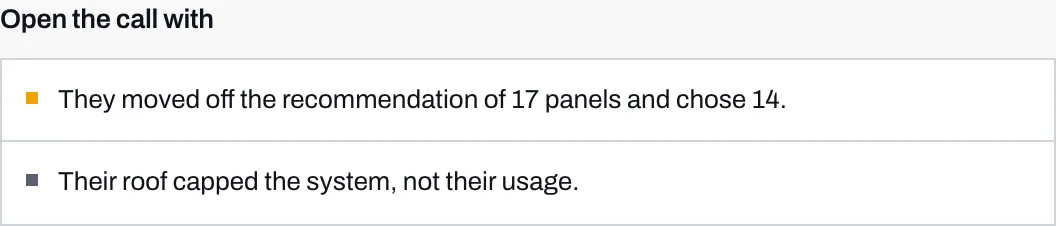
Section titled “Open the call with”The first panel on the left is a short list of things worth knowing before you dial, most pressing first. Every line comes from something the customer did or said in the calculator, never from a guess.
- “Asked for a callback, they want a person, not a document.” Ring them.
- “They moved off the recommendation of N panels and chose M.” The customer deliberately changed the size, and they know they did, because the calculator told them so at the time. Ask why. Somebody who dropped from ten panels to six usually has a budget in mind, and somebody who went up usually has an electric car or a plan for one.
- “At these prices the saving never pays the system back.” Something in the estimate needs looking at before anyone talks money.
- “Low confidence: they did not know their usage.” They answered “I honestly don’t know” about their electricity use, so the saving and payback rest on a typical home of that size. Not knowing your annual usage is completely normal, and “can you find last year’s statement?” is a better opening than a price.
- “They do not own the property.” A landlord is a different sale, not a disqualification.
- “Accepted online, no survey, no deposit and no contract yet.” The customer said yes in their account. See when a quote is accepted.
- “Paying in one go.” A cash buyer, and a genuinely different conversation to a finance buyer. Nothing about credit needs to come up.
- “Their roof capped the system, not their usage.” Their consumption would justify more panels than the roof fits. This is the lead where a site visit is worth more than a phone call, because the roof measurement in the estimate is a rough band and yours will be better.
- “Flat roof.” Tilt frames and row spacing mean a flat roof fits less than its area suggests.
A lead with nothing to flag has no panel at all.
Their roof
Section titled “Their roof”A satellite image of the property, centred on the marker the customer dragged onto their own roof. Underneath it are the address they picked and a Zoom to roof link, which opens the same spot in Google Maps where you can zoom, tilt and measure properly.
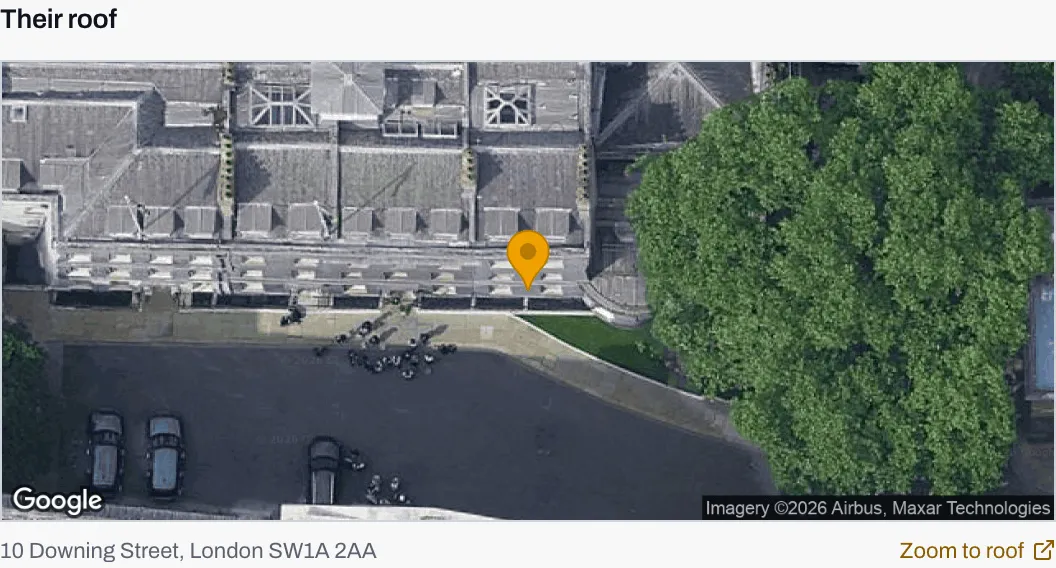
- The marker the customer dragged onto their own roof. The picture is centred on the pin, not on the address.
- The address they picked from the lookup.
- Zoom to roof opens the same spot in Google Maps, where you can tilt and measure properly.
The marker matters more than it looks. Satellite pictures go out of date, terraces confuse address lookup, and a new build can still be showing as a building site. The customer put the pin on the roof they want panels on, so the picture is of the right building even when the address is ambiguous.
If the lead has no location on it, the panel says so and gives whatever address was typed. The estimate still stands; the map simply had nothing to draw.
What they told us
Section titled “What they told us”Their answers from the first three steps of the calculator, as given.
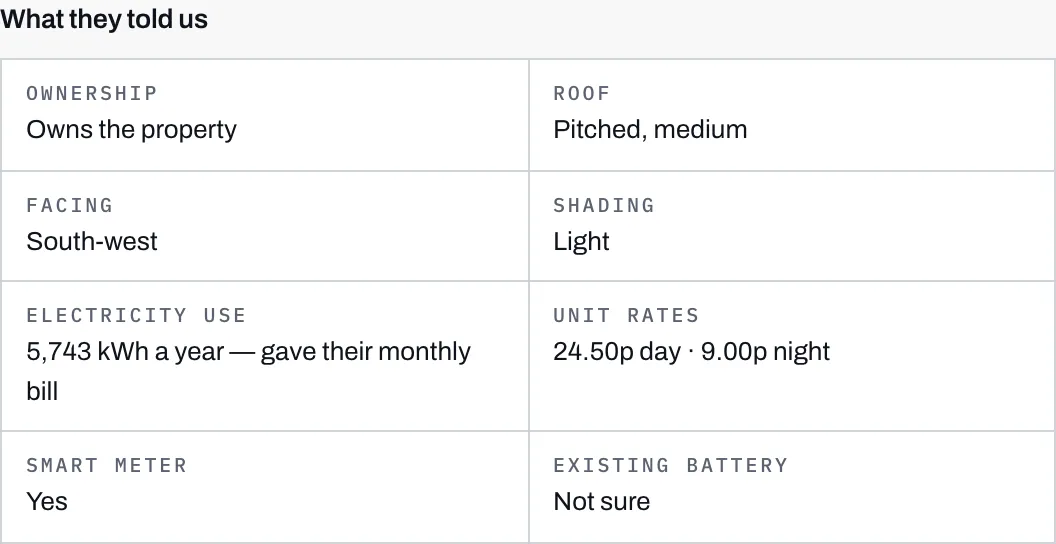
| Field | What you will see |
|---|---|
| Ownership | “Owns the property”, or a note that they let it out, which is a different sale rather than a disqualification |
| Roof | Shape and size band, for example “Pitched, medium” |
| Facing | A compass direction, or “Not stated, south assumed” when they were not sure |
| Shading | None, Light, Moderate or Heavy |
| Electricity use | Annual kWh, followed by how they arrived at it: gave their annual kWh, gave their monthly bill, picked a usage band, or did not know |
| Unit rates | Day rate and night rate in pence, or “Not given” |
| Smart meter | Yes or No |
| Existing battery | Yes, No, or Not sure |
“Not stated, south assumed” is worth reading carefully. It does not mean the roof faces south. It means nobody knows, the estimate assumed the best case, and a west-facing roof will come in lower than the figure they have already seen.
What they configured
Section titled “What they configured”The system the customer built for themselves on step 4, and how they chose to pay for it on step 5.
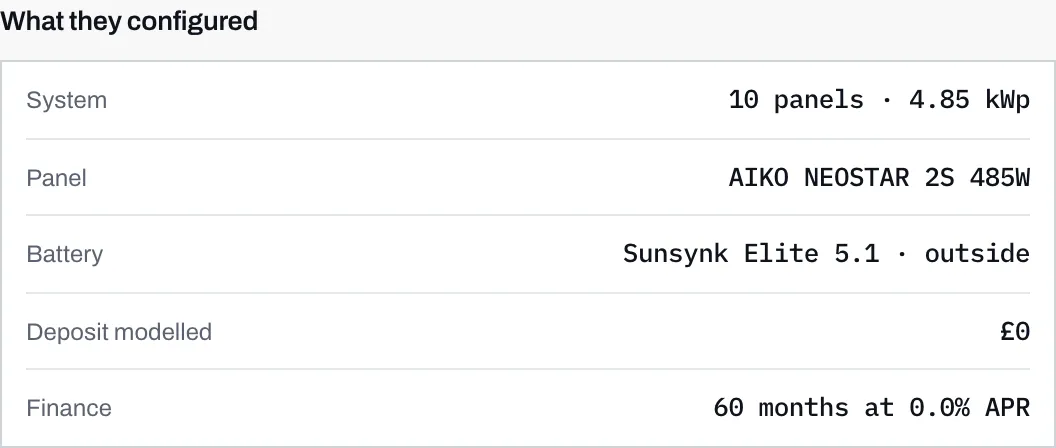
- The battery, named, and with the place they said they would put it.
- The term and APR they modelled. A customer paying in one go reads One-off payment here instead.
The rows are the system size and panel count, the panel model, the battery model and where it would go, the deposit they modelled, and the finance term and APR. The installation cost, saving and payback that came out of it are the figures across the top of the lead.
History
Section titled “History”Every status change on the lead, oldest first, as “From, then To”, with the date and the person who made it.

An enquiry that has never been touched has an empty history and says No status changes yet. The list records changes, and arriving is not a change, so the first line appears the first time somebody moves the lead off New.
Changes are recorded rather than overwritten, so a lead that went New, then Contacted, then Lost, then Interested again keeps all four entries. Automatic moves appear here too, without a name against them, because nobody at your company made them.
What else is on the page
Section titled “What else is on the page”The right-hand column, from the top:
- Notes and, further down, Messages, which look similar and are nothing alike. Read notes and messages before you use either.
- History, above.
- Quote, where you build, send and amend a quotation.
- Documents, covered in files on a job.