Messaging your installer
Every job page has a message thread on it. It is for questions about that job, and its value is that the answers stay attached to the thing they are about, rather than scattered across texts, voicemail and three different email threads.
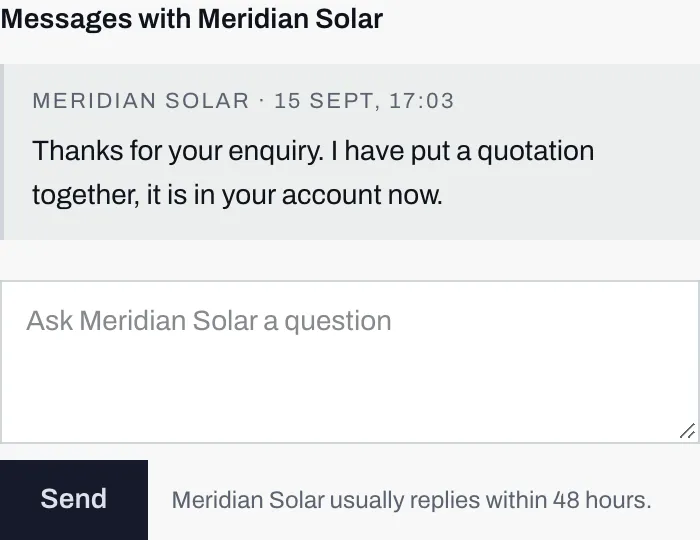
- Each message is stamped with who sent it and when. Yours appear the same way.
- Beside Send, how long this installer usually takes to reply. They set that number themselves.
Asking something
Section titled “Asking something”Scroll to Messages on the job page, type into the box, and press Send. The placeholder tells you what it is for: ask your installer a question. There is room for a long message if you need it, around four thousand characters, so there is no need to be terse.
If the thread is empty it says so, and invites you to ask them anything about your estimate.
Good things to ask here, because they benefit from being written down:
- What panel and inverter are you actually quoting?
- What is included in the price, and what is not?
- How long would the work take, and how many days of scaffolding?
- What happens to the guarantee if I move house?
When to expect a reply
Section titled “When to expect a reply”Beside the Send button, the installer states how long they usually take, in hours. It is the same window they promised for the first phone call, restated where you are about to test it.
Both sides in one thread
Section titled “Both sides in one thread”Messages from the installer appear in the same list, marked with their name and the time. Nothing is hidden from you here, and there is no separate private channel you cannot see. (Installers do keep internal notes on their own system, which are not messages and never appear in your account.)
When they write to you, you get an email about it, and it comes from their name rather than from Solar Desk.
If there is no box to type in
Section titled “If there is no box to type in”If your account came from ticking the box at the end of the calculator, and you have not yet used a sign-in link, the messages are not shown at all. In their place is a note asking you to confirm your email address, with an Email me a sign-in link button.
That is a one-off. See signing in without a password, do it once, and the box appears.
There is also a case where the installer’s side shows no compose box at all, which is when a customer has no account. If you are reading this, that is not you.
Next: sending and receiving files.